
A Google review strategy for multi-location businesses gives every branch its own verified profile, its own review target and a routine for asking customers after each visit, while head office tracks all branches on one monthly scorecard. The need shows up fast. Take a hypothetical dental group with five clinics. Its first practice, open since 2014, has 380 Google reviews and sits at 4.8 stars. The clinic opened last spring has 11, and the newest one dates from July. Same owners, same dentists working shifts across both sites, yet on Maps one looks established and the other looks like it might close any minute.
Chains, franchises and service firms with several addresses deal with versions of this all the time. Google's local results do not treat a chain as one business. Each listing is weighed largely on its own against the businesses competing in that area, and the same contest then repeats at the next address. A review plan built around the flagship rarely survives contact with a suburban branch. The sections below cover profile setup, branch targets, a scorecard, asking and replying, Google's review rules and a launch plan for new sites. No review count or ranking is promised.
Quick Answer: What Is a Multi-Location Google Review Strategy?
A multi-location Google review strategy combines three things: a verified Business Profile for every eligible branch, a review target for each branch based on its local competitors and its own customer numbers, and a simple routine for asking after every visit. Head office sets one reply policy and watches a monthly scorecard, while local managers handle day-to-day requests and replies.
Why Doesn't One Review Plan Work for Every Branch?
Local Results Are Decided Location by Location
Type "dentist near me" in Leeds and Google picks a few practices for the map results using relevance, distance and prominence. Review count and rating feed into prominence, alongside wider signals such as how well known the brand is online. For a chain, the visible contest still happens at each address. The city-centre clinic may face ten rivals averaging 300 reviews, while a suburban branch might lead its area with 40.
The Weakest Listing Sets the Tone
Many customers will not check which branch a review came from. They see the brand name, a 3.6 rating and a last review from six months ago, and they wonder what went wrong at head office. That is why the spread between the best and worst location deserves more attention than the company-wide average, which tends to hide exactly this kind of problem.
How Should Each Location Be Set Up?
Reviews do very little for a listing Google has doubts about, so the setup comes first.
A Verified Profile for Every Eligible Branch
Google allows a separate Business Profile for each location that genuinely operates and serves customers in person during its stated hours, as long as it meets Google's eligibility rules. Businesses that travel to customers instead, like plumbers or cleaners, usually set up as service-area businesses and hide the street address. Placing the profiles under one account structure lets head office manage them from a single login. For larger chains, Google also offers a bulk verification option, commonly described as being for ten or more locations, though each request is reviewed by Google and approval is not automatic. The full process, plus the usual reasons a verification gets rejected, is covered in this walkthrough on how to verify a Google Business Profile.
Name, Address, Phone: Same Everywhere
The business name on the profile should match the sign over the door, word for word. Adding the town or a service ("Smile Dental Leeds Teeth Whitening") counts as keyword stuffing under Google's rules, and profiles get suspended for it. The address already tells one branch from another. The real risks are an old address still sitting on a directory, a phone number that no longer rings or a duplicate listing nobody remembers creating. Check each branch on the website, Facebook and the main local directories, and correct anything that is actually wrong. Small formatting differences like "Street" and "St" matter far less than details that send a customer to the wrong place.
A Landing Page for Every Location
Sending every profile to the homepage wastes the click. A page per branch, showing its address, hours, a couple of photos taken at that site and a few of its own reviews, gives a Maps visitor what they came looking for.
How Many Reviews Does Each Branch Need?
"500 new reviews this year" looks fine on a board slide. Split across eight branches facing very different competition, it tells nobody what to do on Monday.
Benchmark Against the Local Top Three
Run a search for the core service plus the area name at each branch, for instance "physio Camden" or "plumber Harrogate". Results shift depending on where the search is made, so run it from near the branch and treat the numbers as a rough guide. Jot down review count, rating and the date of the newest review for the three businesses at the top. Reaching the middle one of those three is a sensible long-term aim.
Then set the pace from the branch's own figures. A clinic seeing 300 patients a week can aim higher than a workshop seeing 30, and last quarter's review count shows what is realistic.
A Monthly Scorecard
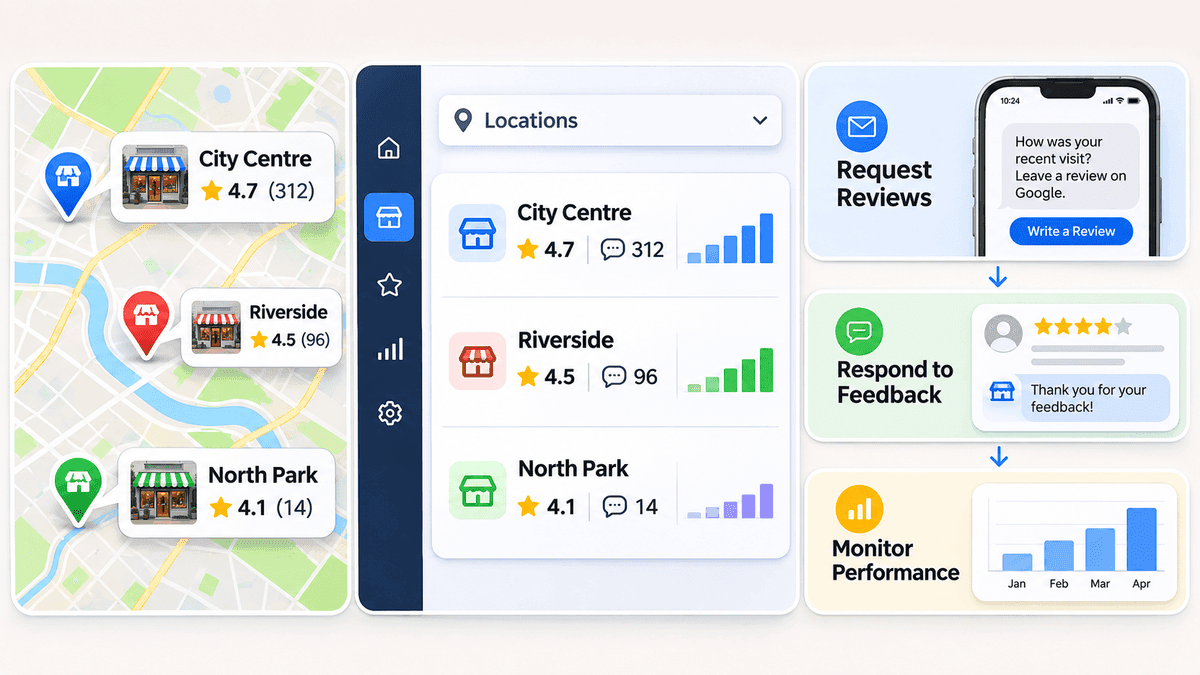
A shared spreadsheet, refreshed on the first Monday of each month, does the job. The figures below are illustrative only:
Location
Rating
Reviews
Newest review
Local top-3 average
Share of top-3 average
Gap
City Centre
4.7
312
2 days ago
280
111%
Ahead
Riverside
4.5
96
3 weeks ago
150
64%
-54
North Park
4.1
14
4 months ago
70
20%
-56
In this example, Riverside trails its local rivals, but North Park is the bigger worry. It has only a fifth of the review volume nearby competitors show, a lower rating and nothing new since summer. Effort for the next quarter belongs there.
Which Branch Should Get Attention First?
Most marketing teams instinctively pour effort into the flagship because it is busy and visible. That is usually backwards. A quiet listing with stale reviews can put off first-time customers, and that weak impression can reflect on the brand as a whole.
Find the cause before doing anything else. Quite often it turns out to be mundane: nobody on the team asks, the QR code on the receipt points to a sister branch, or the location simply opened two years after the rest. Occasionally the reviews flag something real, like 40-minute waits or nowhere to park. Sort that out first, then concentrate review requests at that branch for a couple of months. Bringing a branch like North Park closer to its local rivals usually does more for the overall brand impression than adding to a listing that is already ahead.
How Should Staff Ask for Reviews?
Plenty of satisfied customers would leave a review if somebody mentioned it at the right moment. Usually nobody does, or the email arrives ten days later when the visit is forgotten.
The right moment is straight after the work is finished: the boiler is fixed, the appointment is over, the parcel has turned up. Every profile comes with its own review link, and each branch has to use its own. A follow-up text that drops a Riverside customer onto the City Centre page helps the wrong listing, so someone should click every link before it is printed on receipts or QR stickers.
Keep it low effort for the customer. A QR code at the till, one line at the bottom of the invoice and a short text the same evening reach most people, and customers can then write their review on their own phone in their own time. Each manager then gets a monthly goal based on their own customer numbers and past response rate. A branch where roughly one customer in twenty left a review last quarter (an illustrative figure) already has a realistic starting point, and a brand-new branch can start small and adjust.
Google's Review Rules Every Branch Should Follow
Setting review goals for managers makes the rules matter more, because pressure to hit a number is where shortcuts start. Google's published contribution policies cover several points that apply directly to multi-branch businesses:
- Reviews offered in return for payment, discounts or free goods or services are not allowed, so a manager's target should never come with a customer perk attached.
- Asking only happy customers, or steering unhappy ones to a private form instead of the public listing, goes against Google's rules on discouraging negative reviews and selective solicitation. The routine should ask everyone.
- Reviews from current or former employees, and from people with a close link to the business, count as conflicts of interest and are prohibited.
- Fake or paid reviews are prohibited outright and can be removed.
Tying staff bonuses to the number of reviews collected deserves particular care, since it can push people toward exactly the behaviour above. Rewarding the routine (every customer asked, every review answered) is safer than rewarding the count. Google updates its policies from time to time, so its own help pages hold the current wording.
Why Steady Review Growth Matters
Recency Counts as Much as the Total
Shoppers look at dates as well as stars. A listing whose newest review is from last week feels open and busy. One whose last review is from March raises questions, even with a high total. Every branch benefits from feedback that keeps arriving month after month rather than in one big push.
Build a Rhythm, Not a Rush
The simplest way to keep reviews current is to invite customers to share honest feedback after genuine interactions, without selecting them based on whether their experience was positive or negative. Make this a regular practice across every branch rather than relying on occasional review campaigns. A consistent approach helps businesses collect fresh customer feedback over time.
Coordinating requests, replies and profile upkeep across ten or twenty locations can become difficult without a clear system, and some businesses look at Google Business Profile optimization services to help manage profiles and monitor performance alongside their own routine.
How to Measure Review Performance Across Locations
A total review count on its own says very little. Track these five numbers for each branch every month, alongside the scorecard:
- New reviews this month, compared with the month before.
- Rating trend over the last three months, which shows direction better than the lifetime average.
- Response rate, the share of reviews that received a reply.
- Response time, the average hours between a review and its reply.
- Request-to-review rate, reviews received divided by requests sent, which shows whether the asking routine is working.
A branch with a falling rating trend and a low response rate needs a conversation with the manager, whatever its total looks like.
Reply Policy: One Rulebook, Local Voices
Shoppers scroll through replies nearly as carefully as through the reviews themselves, especially the replies to bad ones. A one-page policy keeps eight branches from handling this eight different ways.
Set a reply window first, say 48 hours for everything and same day for complaints. Then split responsibility. Branch managers usually know who the customer was and what happened, so routine replies sit with them. Head office picks up the one and two star reviews, anything about refunds, injuries or safety, and anything with a chance of spreading around the local area.
Sample replies help new managers find the tone. A single copy-paste template does the opposite, because a page where every reply reads "Thank you for your feedback, we value your business!" looks automated. Mentioning the branch, the staff member or the specific job makes a reply sound like a person wrote it.
Healthcare, legal and financial businesses need extra care. A reply should not confirm that someone is a patient or client, or mention treatment, appointments or account details, since privacy rules in many countries restrict that. Keep those replies general, apologise where it fits, and offer a direct phone number or email for that branch.
How to Plan Reviews for a New Location
However well known the brand, a new site launches with zero reviews. Nothing carries over from the other branches.
- Set up and verify the profile weeks before opening, since verification timing varies from a few days to much longer.
- Before launch, add opening hours, categories, photos and the link to the location page.
- Print the QR code and set up the review link for day one. Opening-week customers tend to be among the keenest.
- Use the local top-three check and the branch's expected customer numbers to set a 90-day goal.
- Answer every early review personally, which shows the new branch is staffed and paying attention.
Mistakes That Lose Reviews
- Leaving bad reviews unanswered. A two-star review with no reply sits near the top of the listing for weeks and tells every visitor that nobody is listening. A calm, specific reply within a day or two often matters more to the next customer than the review itself.
- Duplicate listings. A forgotten second profile for the same address splits the reviews in two. Search each branch address on Maps and request a merge or removal for any duplicates.
- A new profile after moving. Reviews generally stay with the listing they were written on. When a branch genuinely relocates, update the address on the existing profile rather than creating a new one. Google has its own process for moves and duplicate merges, but there is no guarantee every review carries over, so screenshot them before any change.
- Rewarding review counts. Bonuses or perks tied to the number of reviews can push staff toward practices Google prohibits.
Frequently Asked Questions
Does each location need its own Google Business Profile?
Yes, if it is an eligible location that genuinely operates and serves customers during its stated hours. One listing covering several addresses goes against Google's guidelines and stops each branch from appearing in its own local results.
How many Google reviews should each location have?
There is no fixed number. Check the top three competitors near the branch, aim for the middle one over time, and set monthly goals from the branch's own customer volume.
Can Google reviews be moved from one location to another?
Usually not. Reviews from one branch do not transfer to another. Google may combine reviews when it merges duplicate listings for the same place, but that is handled by Google and is not guaranteed.
How often should a multi-location business ask for reviews?
After every completed visit, job or order. A routine that runs every week at every branch keeps reviews recent far better than occasional one-off drives.
What metrics show whether a review strategy is working?
New reviews per month, rating trend, response rate, response time and request-to-review rate, each tracked separately for every branch.
Should head office or local staff reply to reviews?
Both, with clear roles. Branch managers take everyday replies, while head office handles negative or sensitive reviews and checks that every location sticks to the policy.
Can staff be rewarded for collecting Google reviews?
Customers cannot be given incentives for reviews under Google's policies. Staff rewards are a grey area worth handling carefully, so rewarding the routine (every customer asked, every review answered) is safer than rewarding the number collected.
Final Thoughts - A Review Strategy That Fits Every Branch
None of this needs expensive software. It needs profiles set up properly, a realistic target for each branch, staff who ask at the right moment and a routine that keeps going month after month. Pull up the scorecard on the first Monday of the month and look at the bottom row first. That is normally where the quickest wins are hiding.
About the Author
Sarah JohnsonGrowth Specialist
Specializes in helping local businesses maximize online visibility and customer engagement.